|
WA8LMF Home Page | Main Ham Radio Page | Main Links Page | Updated 01 February 2025 |
When the original CD was released decades ago, computer playback of audio recordings was very inconsistent with varying timing due to low-cost software decoding (the "AC97 codec") being used on computer CD-ROM drives for audio playback. This could bias comparative TNC testing, requiring the test disk to be produced as an audio CD rather than a file-based CD-ROM, allowing it to be played back on high-quality stereo CD players rather than computers.
Today, the very precise RealTek HD-Audio chips for audio playback in computers is universal. It is now practical to re-release the disk as a normal data-based CD-ROM, for playback on computers.
The contents of the files are identical to the original disk - only the file format has changed from lossless CD audio tracks on an audio CD to lossless FLAC file tracks on a CD-ROM.
For convenience in playing the FLAC files, a very compact audio player tool, the "VU Player" is included in a folder of the same name on this disk. It's a small, fast-loading multi-format audio file player. For ham applications, this program is very useful for playing back test signals such as the APRS packet test signals on this CD, RTTY or SSTV. It is also useful for playing back voice recordings for automated CQing, etc.
Just drag/drop the audio files of interest from the
Windows File Explorer to the open window in VU Player.
The VU Player plays WAV, WMA, MP3, OGG, FLAC, APE and audio CD formats. Will
convert to/from any of these formats. As an added feature, it emulates a pair of
classic analog volume unit meters with the unique dynamics of the VU meter
pointers absolutely faithfully reproduced.
To play M4A/MP4 files, install the last and ;final
version of the Apple Quicktime player. This installs the MP4 codec on your
system, if it's not already present, which VU Player can then access for M4A
playback/conversion.
NOTE: As supplied it will play MP3 files, but not encode to this format.
Download the LAME 3.97 MP3 codec and place a copy of the DLL in the main VU
Player folder. The player will then be able to "automagically" convert/save to
MP3 format.
To aid in selecting the cuts on a CD-ROM drive that lacks a front-panel track-number indicator, voice announcements and cue tones have been added to the beginning and end of each track.
Track 1 has a DTMF digit "1" at the beginning and a DTMF digit "6" at the end.
Track 2 has a DTMF digit "2" at the beginning and a DTMF digit "7" at the end.
Track 3 has a DTMF digit "3" at the beginning and a DTMF digit "8" at the end.
Track 4 has a DTMF digit "4" at the beginning and a DTMF digit "9" at the end.
Track 5 has a DTMF digit "5" at the beginning and a DTMF digit "0" at the end
The differing digit values could possibly be used with a DTMF decoder to automatically start or stop data acquisition devices.
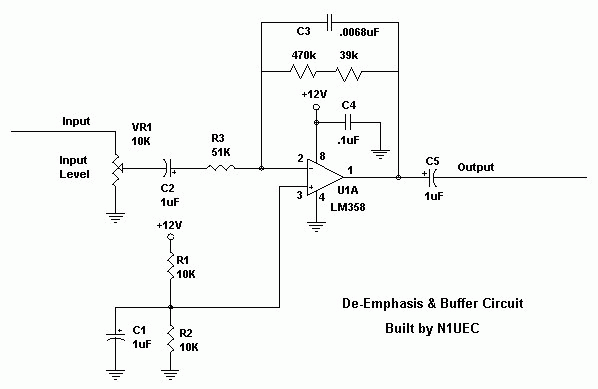
Note that all these recordings are taken directly from the discriminator. Tracks 1, 3 and 4 are not de-emphasized. Track 2 is de-emphasized (see below). If you wish to characterize how various TNCs behave when connected to a radio's speaker or headphone output (rather than directly from the discriminator such as from a 6-pin mini-DIN "data" jack.), you will have to insert an RC de-emphasis network between the CD player and the device under test. Click Here for a schematic of an active version of such a circuit.
Track
1 is an off-the-air recording of
40 minutes of activity on 144.39 MHz in Los Angeles, California, during
the afternoon rush hour at about 5:00 PM when the channel is totally
saturated to several hundred percent of the Aloha threshold. This
recording was taken from the non-de-emphasized direct discriminator
output of a Yaesu FT-1500 via the 6-pin mini-din data connector. It
contains a variety of over- and under- deviated signals, packet
collisions, rapid-fire packets with practically no pause between them,
raw NMEA string trackers, TinyTraks, clueless idiots using CW ID on
packet, etc. All periods of dead air over about 1 second have been
edited out so that 40 minutes of real-life activity have been
compressed to 25 minutes on the CD.
This track is intended to be played back directly into TNCs to compare
the performance of various TNCs "under fire" in the real world . The
rapid pace of the packets should be a good test of the ability of
buffers in TNCs and associated applications to hand a rapid flow of
data without overrunning.
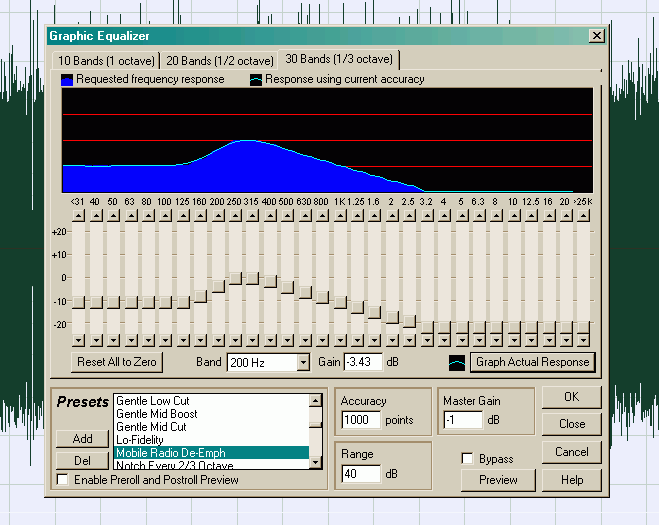
Track 2 is identical to Track 3 except that a precise 6db-per-octave/20db-per-decade de-emphasis between 300 and 3000 Hz has been applied to simulate the typical de-emphasis found at the volume control or speaker output of the typical land-mobile receiver. This can used to evaluate the relative performance of TNCs in handling raw non-deemphasized discriminator audio vs de-emphasized speaker audio. The effectiveness of jumper-selected equalization networks available inside some TNCs can also be tested. This track was created by applying the graphic equalizer filter in Adobe Audition, shown below, set to simulate the standard EIA land-mobile radio de-emphasis curve.
Note that a roll-off was also applied below about 200 Hz to simulate the typical highpass filtering used to keep CTCSS ("PL") tones out of the speaker of mobile radios.
The three following tracks are for TNC alignment rather than testing. They are intended to evaluate TNC demodulator tolerance to tone "skew" (unequal levels of the 1200 and 2200 Hz tones).
Track
5 is a direct recording of one
minute of a KPC3+ TNC in the CAL mode sending the alternating 1/0 test
pattern (i.e. alternating between 1200 and 2200 Hz tones) with both
tones at the same amplitude.
Track
6 is the same recording with a
precise 6 dB/octave 20 dB/decade pre-emphasis applied as in Track 3
above. This is the pre-emphasis curve set in the Audition audio editor.
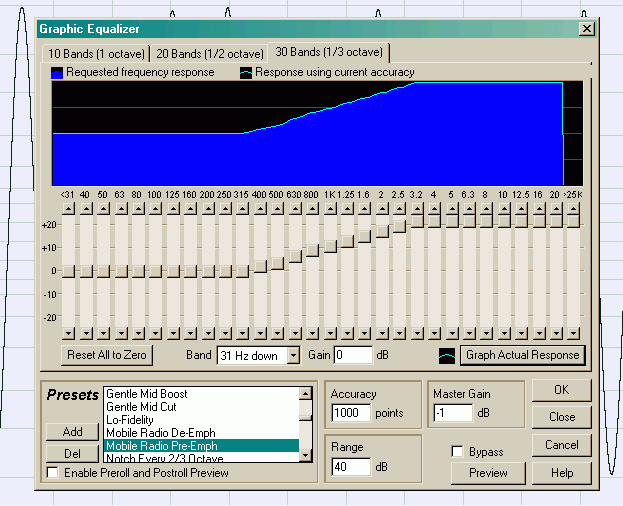
Track 7 is the same recording with a mirror-image precise 6 dB/octave 20 dB/decade de-emphasis applied.
Click links for examples of FLAT Response, PRE-Emphasized, and DE-Emphasized waveforms.
(c) Stephen H. Smith
Revised 31 August 2009
Original published 30 October 2006
Revised for CD-ROM FLAC-file format 1 February 2025
wa8lmf.net